
LinkedIn InMail Response Rate Statistics: What Actually Works in 2026
Here’s the thing about LinkedIn InMail—it either feels like magic or a complete waste of money. You send that perfectly crafted message to your dream prospect, wait anxiously, and either get crickets or an actual conversation. The difference? Understanding the numbers behind what actually works.
If you’re searching for LinkedIn InMail response rate statistics, you’re probably trying to decide if InMail is worth the investment. Or maybe you’re already using it but wondering why your results aren’t matching what everyone else claims. Either way, this guide breaks down the real numbers, so you can stop guessing and start booking more meetings.
LinkedIn InMail Response Rate: The Baseline Numbers
Let’s cut straight to what matters. The average LinkedIn InMail response rate sits between 10% and 25%. That’s your benchmark. If you’re hitting anywhere in this range, your strategy is working. If you’re below 10%, something needs fixing.
But here’s where it gets interesting. Not all InMail messages perform equally. The data shows three distinct performance tiers:
Standard performers (most people fall here) see response rates of 10-15%. They’re using basic templates, targeting the right people, but missing the personalization that moves the needle.
High performers consistently hit 18-25% response rates. These folks understand personalization, nail their timing, and leverage Sales Navigator’s targeting features to reach people actually interested in what they’re offering.
Elite tier performers break 30-40% response rates. They’ve mastered social selling—combining InMail with content engagement, profile views, and warm introductions before hitting send.
Compare this to cold email, which typically generates 1-5% response rates. That means InMail is 2.6 to 5 times more effective at getting replies. The professional context of LinkedIn creates an environment where business conversations feel natural, not intrusive.

Industry Response Rates: Where InMail Works Best
Your industry dramatically impacts your InMail success. Here’s what the 2025 data reveals:
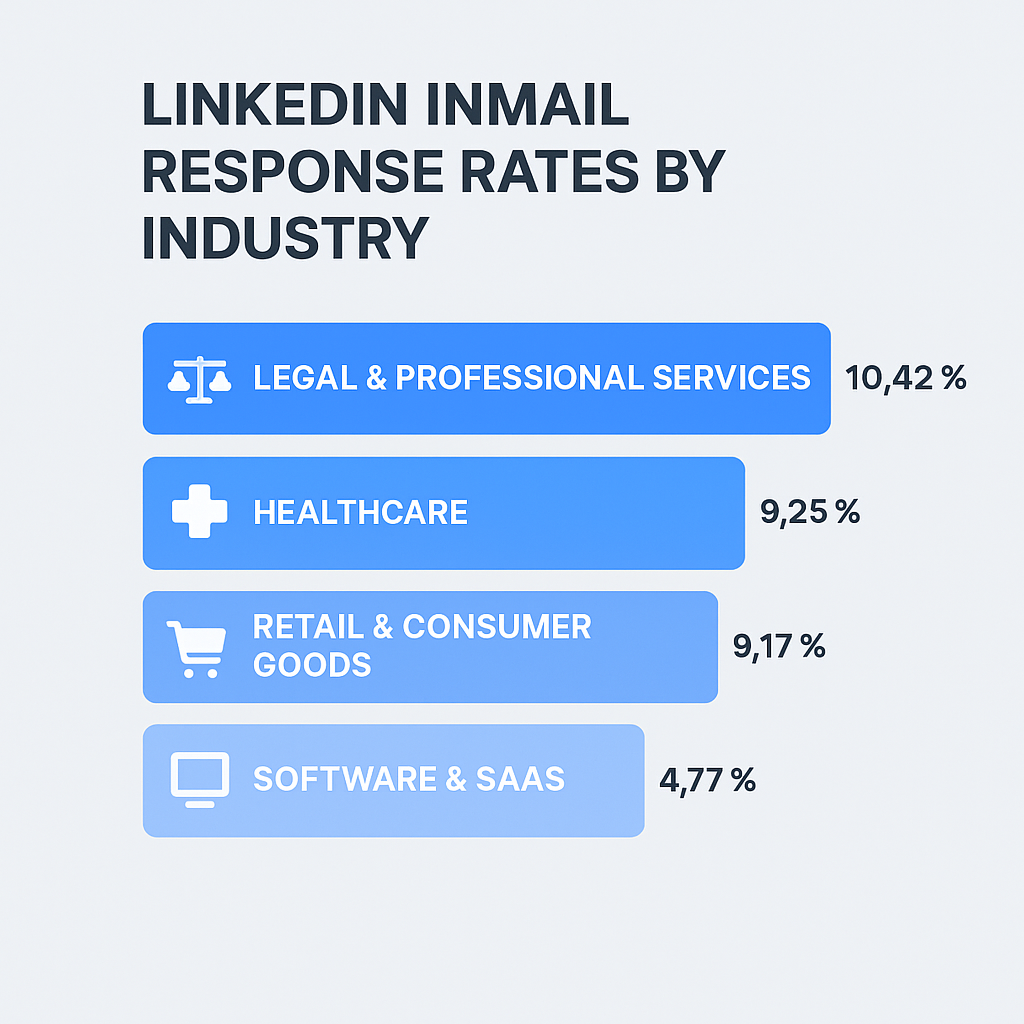
Legal & Professional Services: 10.42% Lawyers, consultants, and professional service providers view LinkedIn as a networking platform. They’re actually receptive to InMail because partnership opportunities are part of their business model.
Healthcare: 9.25% Healthcare professionals are constantly seeking efficiency solutions. If your message addresses operational pain points or time-saving tools, expect strong engagement.
Retail & Consumer Goods: 9.17% Dynamic market conditions make retail professionals open to supply chain innovations and technology solutions that give them a competitive edge.
Software & SaaS: 4.77% This is the paradox. The people who build sales automation tools are the most resistant to being sold to. SaaS professionals get hit with SO much automated outreach that they’ve developed immunity to templated messages.
If you’re targeting SaaS, you need hyper-personalization. Reference their recent podcast appearance, comment on their LinkedIn post before sending InMail, or find a mutual connection. Generic value propositions get ignored instantly.
Job Title Response Rates: Who Actually Replies
The person’s role matters as much as their industry. Here’s who responds best to InMail:
HR & Talent Acquisition: 12.08% Their job is literally to communicate with people on LinkedIn. If you’re selling HR tech or talent solutions, this is your sweet spot.
Product Management: 10.24% Product managers are solution-oriented. They’re actively looking for tools and processes that optimize workflows. Lead with how you solve their specific problems.
Operations: 10.02% Operations folks feel daily pain from inefficiencies. InMail messages that speak to operational bottlenecks with concrete ROI get noticed.
C-Level Executives: 6.98% CEOs and executives are time-poor and inbox-swamped. Unless your message is extremely relevant and brief, it’s getting ignored.
Sales & Marketing: 6.32-6.40% Selling to salespeople is tough. They recognize every tactic in the book. Unless your message is genuinely differentiated, they’ll dismiss it as amateur prospecting.
Message Length: Why Shorter Wins
Want to boost your response rate by 22%? Keep your InMail under 400 characters.
Here’s why: 57% of LinkedIn traffic comes from mobile. A 400-character message fits on one mobile screen without scrolling. Longer messages create cognitive load—they signal “work” to the recipient.
Messages over 1,200 characters see an 11% decline in response rates compared to the average. Your prospect doesn’t want to read a novel. They want to quickly understand what you’re offering and decide if it’s worth their time.
The formula: Hook (1 sentence) + Value (1-2 sentences) + Ask (1 sentence). That’s it.
Subject Lines That Actually Get Opened
While InMail has high open rates naturally, your subject line still matters. It frames whether someone opens your message with curiosity or annoyance.
Personalized subject lines boost response rates by 30.5%. That means referencing something specific about them, their company, or a mutual connection.
Top-performing subject line formats: “Question about [Company] expansion” “Mutual connection: [Name]” “[Specific topic] strategy”
Avoid vague clickbait like “Quick synergy chat” or “Partnership opportunity.” These scream spam. Your subject line should give them a legitimate reason to care.
Personalization: The Non-Negotiable
63% of people never respond to non-personalized messages. Let me repeat that: two-thirds of your market is completely invisible to you if you’re sending generic templates.
Personalized InMails achieve 15-20% higher response rates than bulk messages. But here’s the catch: typing “Hi {{FirstName}}” doesn’t count as personalization anymore. That’s a token. True personalization requires connecting your outreach to specific context about the prospect.
Examples of real personalization: “Saw your LinkedIn post about [topic]” “Congrats on the Series B funding” “Your comment on [article] resonated with me”
Deep personalization—referencing specific content or mutual connections—can boost reply rates by 40-300% compared to zero-context outreach.
Timing: When to Send Your InMail Messages
Behavioral patterns on LinkedIn follow the professional work week. Here’s when to hit send:
Best Days: Tuesday: 6.90% reply rate (highest performer) Thursday: 6.85% reply rate (close second)

Decent Days: Monday: 6.85% reply rate (risk of weekend backlog getting bulk-archived)
Avoid: Weekends: 2.6-6.40% reply rate (people aren’t in business mode)
Best Times: 8:00-10:00 AM (morning routine, coffee scroll) 5:00-6:00 PM (commute time on mobile)
The morning window aligns with professionals checking LinkedIn before diving into deep work. Evening timing captures people browsing on their phones during commutes.
Sales Navigator: Advanced Targeting Features
Sales Navigator isn’t just about having more InMail credits. It’s about targeting intent, not just identity.
Job Change Signal: People who changed jobs in the last 90 days are 3x more likely to respond. New hires are actively evaluating tools and processes.
Company Followers: Prospects following your company page already have brand affinity. They’re warmer targets with significantly higher conversion potential.
Profile Views: Users are 78% more likely to accept InMail from someone who viewed their profile in the last 30 days. This simple pre-warming tactic creates familiarity before you message.
Smart Links: Share trackable documents (decks, PDFs, case studies) and see exactly who opened them and how long they spent on each page. This data enables hyper-relevant follow-ups.
InMail vs Cold Email: The Real ROI Comparison
Let’s talk numbers. InMail costs roughly $1.60 per message (based on Sales Navigator subscription and credit allocation). Cold email costs $0.01-$0.10 per send.
But here’s what matters: It takes approximately 100 cold emails to generate the same number of replies as 4-10 well-crafted InMails.
For high-ticket B2B sales where average contract value is $10K+, the higher cost of InMail is negligible compared to the time saved. For low-margin products, cold email remains the only economically viable channel.
The winning strategy? Use both. Cast a wide net with email, then use InMail for VIPs who didn’t respond or to multi-thread into accounts where you already have engagement.
Multi-channel outreach (Email + LinkedIn + Phone) boosts results by 287% compared to single-channel approaches. The InMail acts as air cover, making your name familiar when you eventually call or email.

